
InPix Pro is a powerful and easy-to-use photo editing software designed for photographers, studio designers, and beginners who want fast and professional results without complex tools. With its one click photo finishing, auto color correction, and advanced face retouching features, this software makes image editing simple and efficient. Whether you are working on wedding albums, portrait photography, or social media images, InPix Pro helps you achieve high-quality results in just a few clicks. If you are already using plugins like iCorrect Portrait V2 plugin for Photoshop, then this software can be a great standalone alternative for quick editing tasks.
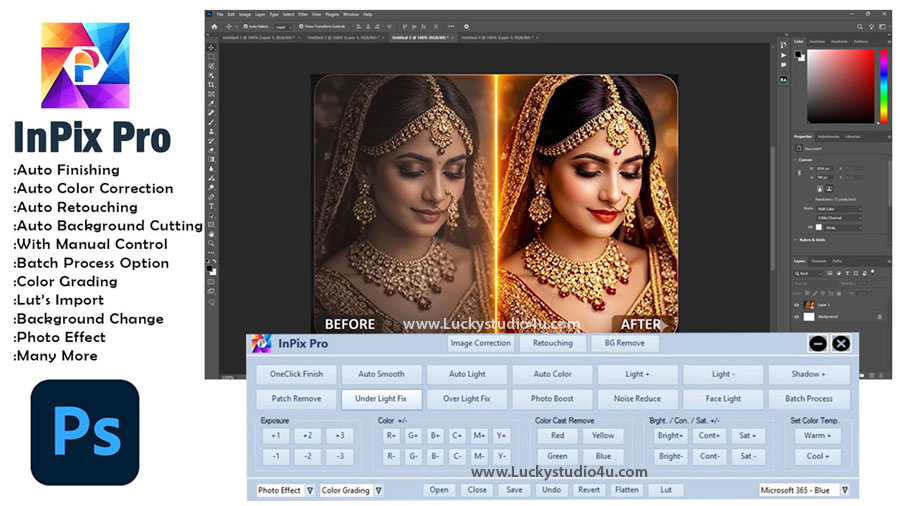
The software is specially built for users who want to save time while maintaining professional quality. From automatic photo color correction to detailed manual retouching, InPix Pro offers everything in one place. You can easily enhance brightness, adjust contrast, remove noise, and even fix exposure issues without any technical skills. Its simple interface and one click editing tools make it perfect for beginners as well as professionals who want to speed up their workflow and deliver better results to their clients.
InPix Pro – Auto Photo Finishing, Color Correction & Retouching Software
InPix Pro provides a complete solution for photo finishing, color correction, and portrait retouching. This software includes advanced tools like auto light adjustment, color balance, exposure control, and batch processing, which allow users to edit multiple images quickly and efficiently. If you are familiar with tools like Radiant Photo auto color correction software, then you will find InPix Pro equally powerful for enhancing image quality. It also features one click finish, which automatically improves the overall look of your image by adjusting colors, lighting, and sharpness. This makes it ideal for wedding album designers, studio editors, and freelance photographers who need fast and consistent results.
Another strong advantage of InPix Pro is its dedicated retouching section. You can remove pimples, smooth skin, whiten teeth, enhance eyes, and apply makeup effects like lip enhancement and eye shadow. The software also allows you to manually adjust brightness, contrast, and saturation for more control over your editing. Whether you are editing portraits, fashion photos, or product images, InPix Pro ensures that your final output looks clean, professional, and visually appealing without requiring advanced editing skills.
InPix Pro Video Tutorial
To make things even easier, you can follow the complete video tutorial included in this article. The video shows how to use InPix Pro step by step, including image correction, face retouching, and background removal. It helps beginners understand each tool clearly and shows real-time editing results. By watching the tutorial, you can quickly learn how to apply one click finishing, adjust colors, and use retouching features effectively. This makes the learning process simple and helps you get professional results without any confusion.
InPix Pro Software Features
- One Click Photo Finishing for instant image enhancement
- Auto Photo Color Correction for balanced and natural colors
- Auto Light and Exposure Adjustment tools
- Brightness, Contrast, and Saturation control options
- Noise Reduction for low-quality or grainy images
- Face Light enhancement for portrait photography
- Patch Remove tool to fix unwanted spots
- Under Light and Over Light Fix options
- Advanced Color Adjustment (RGB, CMY controls)
- Color Cast Remove (Red, Yellow, Green, Blue)
- Warm and Cool Color Temperature adjustment
- Auto and Manual Retouching tools
- Pimple Remove and Wrinkle Remove features
- White Teeth and Eye Enhancement options
- Lip Enhance, Lip Liner, and Eye Shadow effects
- Hair Dark and Jewellery Highlight tools
- Batch Processing for multiple image editing
- One-Click Background Remove feature
Conclusion
InPix Pro is an all-in-one photo editing software that combines auto photo finishing, color correction, and professional retouching tools in a simple interface. It is perfect for photographers, album designers, and beginners who want fast and high-quality results. With its one click editing features and advanced controls, you can easily enhance your photos without spending hours on manual editing. If you are looking for a reliable and easy-to-use photo editing solution, InPix Pro is definitely a great choice for improving your workflow and delivering professional results.
Note:
If you’re facing issues with downloading the file such as "it may take up to 24 hours to be able to view or download the file" So please ensure you are logged into your Google account before attempting to download. This usually resolves the issue and allows you to download the file without any waiting time.
















