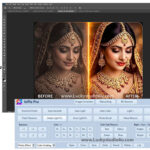
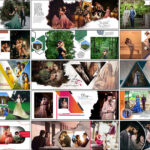
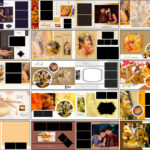
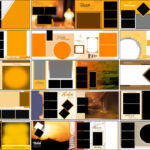
One Click AI Album 2026 Software is a modern photo album tool that streamlines the process of creating professional albums without compromising design quality. The software uses smart automation to arrange images into clean, balanced layouts while still allowing full manual control when you want to adjust the details. It is built for wedding photographers, studios, and designers who regularly work with large photo sets and need a reliable workflow that cuts down repetitive tasks. The interface is clear and easy to learn, allowing new users to start designing quickly and experienced users to complete albums much faster than a fully manual process. Templates, PSD support, and easy export options make this a practical choice for both print and digital deliveries. If you are researching album design tools or comparing software choices, see this helpful guide on album design software for more options and comparisons: Album Designs Software.

How One Click AI Album 2026 Works
One Click AI Album 2026 begins by analyzing your uploaded images for orientation, color balance, and visual weight. The built-in engine groups photos that look good together, then places them into spreads with consistent spacing and alignment. This reduces the need for manual placement on every page and gives you a strong starting layout in minutes. The auto-layout drafts are easy to review: you can accept them as-is for a fast turnaround or use them as a base for small edits. The tool also supports PSD templates so designers can bring their own layered layouts into the workflow and combine custom Photoshop designs with the auto-arranged spreads. If you want to compare another fast auto-layout tool, check the Julie Liberty auto album review here: Julie Liberty Auto Album Software.
After the AI generates initial pages, you can switch to manual mode for fine adjustments. Manual controls let you crop and tilt images precisely, change masks, adjust photo ordering, and tune the background or frame styles for each spread. This blend of automation and manual editing means you save time on layout while keeping the ability to apply your signature style. The software handles large folders and high-resolution files smoothly, so you can load full wedding galleries and let the engine build drafts quickly. When you need to compare features and workflow with another studio-level product, this Album Xpress guide provides a useful comparison: Album Xpress 13.5.
Smart Auto-Design to Accelerate Your Workflow
The smart auto-design is the core advantage of One Click AI Album 2026. Instead of placing each photo by hand, the software applies rules around balance, space, and color harmony to create spreads that feel intentional and professional. This is especially useful for studio work where speed matters — the software can generate a full album draft in a fraction of the time it takes to design pages manually. The auto-design also helps maintain a consistent look across all pages, which is important when producing multiple albums or working on large projects. Drafts are presented so you can scan through spreads, approve the flow, and quickly make any small changes without rebuilding pages from scratch.
Flexible Manual Editing Whenever You Want
Flexibility is key: One Click AI Album 2026 gives you full manual editing on top of smart automation. You can change backgrounds, swap templates, add overlays, or adjust photo masks to match a client’s vision. Crop and tilt controls are precise and easy to use, letting you refine composition without complex steps. Designers who prefer fully custom pages can also import PSD templates and edit layers for maximum control. This combination ensures the software fits both fast-turn projects and high-end custom albums where every page requires a personal touch.
Features of One Click AI Album 2026 Software
Below are the main features as described on the official product resources, presented clearly so you can see what the software offers at a glance.
- AI Album Design: Automatic layout engine that groups images and creates balanced spreads.
- Large Template Library: Ready-made themes and page layouts for weddings, travel, and other events.
- PSD Template Support: Import and use custom Photoshop PSD files and layered templates.
- Tilt & Crop Tool: Crop and tilt images in one step for precise composition.
- Batch Photo Management: Import, sort, and edit large numbers of images efficiently.
- Background Customization: Textures, color themes, overlays, and decorative elements for pages.
- High-Resolution Export: Export print-ready files in high quality for professional labs.
- Training & Tutorials: Built-in guides and video tutorials to speed up onboarding.
- Flexible Licensing: One-time purchase with initial free updates and lifetime usage.
- Customer Support: Direct support channels for setup, troubleshooting, and queries.
System Requirements For One Click AI Album 2026
To use One Click AI Album 2026 smoothly, the following specifications are recommended:
- Operating System: Windows 10 or Windows 11 (64-bit recommended)
- Memory: Minimum 8 GB RAM; 16 GB or more recommended for large projects
- Processor: Modern dual-core or quad-core CPU (Intel i3 / Ryzen 3 or better)
- Graphics: Integrated GPU works; dedicated GPU recommended for faster previews
- Storage: At least 10 GB free space; SSD recommended for faster loading
- Display: Full HD (1080p) or higher for accurate layout work
- Internet: Optional for core use; required to download new templates or updates

Conclusion
One Click AI Album 2026 offers a practical balance between speed and creative control. Its auto-design engine saves significant layout time, while manual tools and PSD support let you produce custom, high-quality albums when required. The software is well-suited for wedding photographers, studio environments, and designers who need to deliver polished albums quickly. If you want an efficient workflow that still allows you to apply a personal design touch, this tool is worth testing on a sample project.
Note:
If you’re facing issues with downloading the file such as "it may take up to 24 hours to be able to view or download the file" So please ensure you are logged into your Google account before attempting to download. This usually resolves the issue and allows you to download the file without any waiting time.