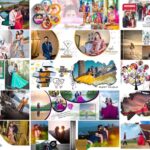
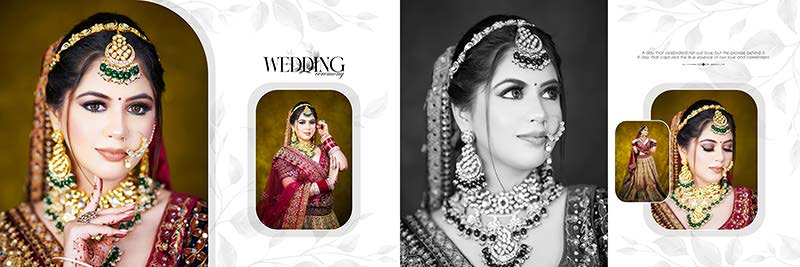
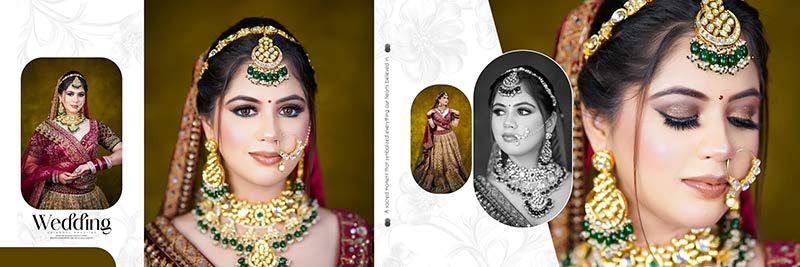
Bridal portraits deserve a special place in a wedding album. Close-up photographs, traditional outfits, jewellery, makeup, and the bride’s expressions all help capture the beauty of the wedding day. This collection of 20 Bridal Portrait Album Design PSD Templates 12×36 offers ready-made layouts for photographers and album designers who want to present these photographs in an attractive way. The designs feature green, pink, purple, and red colour themes, along with selected black-and-white portrait styles. These layouts are suitable for creating portrait-focused album pages without designing every frame from scratch. Photographers looking for more wedding album PSD layouts for different photography projects can also explore the wider collection on LuckyStudio4U. The templates are provided in Adobe Photoshop PSD format and use the 12×36 album layout, giving designers a wide space to arrange large bridal portraits with supporting photographs and decorative elements.

Bridal Portrait PSD Pack Details
- Total Designs: 20 bridal portrait album design PSD templates
- Album Size: 12×36
- File Format: Adobe Photoshop PSD
- Design Style: Bridal portraits and close-up photography
- Colour Themes: Green, pink, purple, and red
- Additional Style: Selected black-and-white portrait layouts
Give Bridal Portraits More Space in the Album
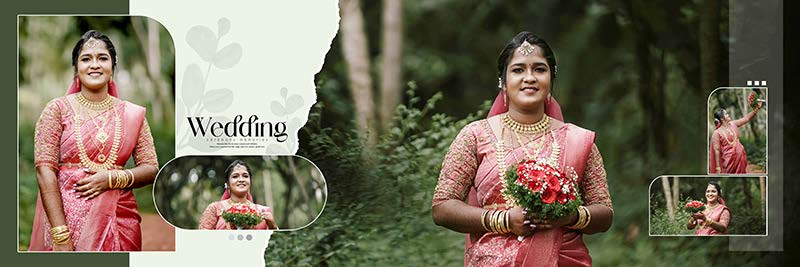
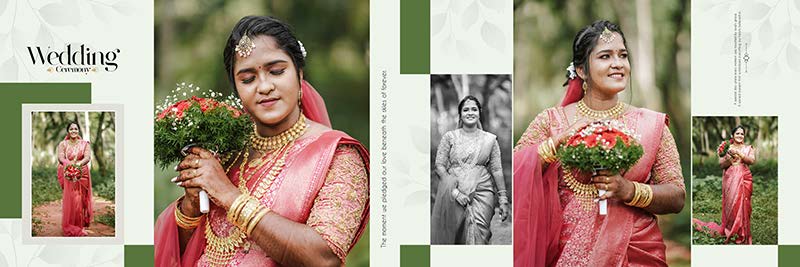
A bridal portrait album needs a different approach from a page filled with family photographs or wedding ceremony pictures. The main image may show the bride’s face, jewellery, hairstyle, outfit, or makeup, so the layout should keep these details clear. These 12×36 bridal portrait album PSD templates offer a starting point for arranging large portraits alongside smaller photographs without losing the main focus.
The wide format can be used for a single standout portrait or a combination of close-up and full-length photographs. Smaller supporting images can show different poses, expressions, or details from the same bridal photoshoot. This creates variety across the spread while keeping the bride as the main subject.
When a project requires several different page layouts, the 12×36 album PSD templates for wide portrait spreads provide additional options for building the rest of the album.





Colour Themes for Bridal Album Design
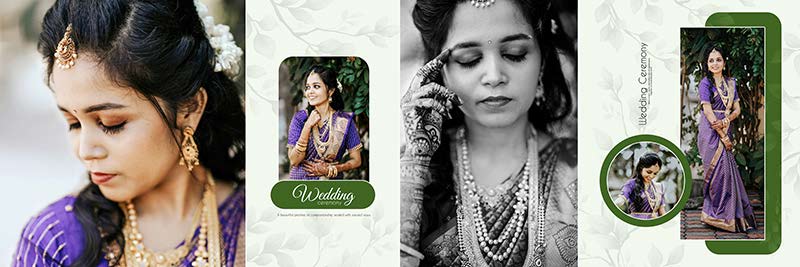
The colours surrounding a portrait can affect how the final page looks. A background should complement the bride’s outfit and the lighting in the photograph while keeping the face and important details easy to see. The green, pink, purple, and red themes in this collection give designers several options for different bridal photography styles.
Green and Pink Bridal Layouts
Green backgrounds can provide contrast around bridal outfits and jewellery, depending on the colours in the original photograph. Pink themes can create a soft look for romantic portraits and close-up shots. These colour choices work best when they support the photograph rather than overpowering it.
Purple and Red Wedding Album Designs
Purple and red layouts offer richer colour options for bridal portraits. They may suit photographs with traditional outfits, detailed jewellery, and decorative backgrounds. When using stronger colours, it helps to keep other page elements balanced so that the portrait remains the main attraction.
Black-and-White Bridal Portraits
Black-and-white photography offers a different way to present the bride. Without strong colour in the photograph, facial expressions, lighting, textures, and contrast become more noticeable. These portrait styles can add variety to an album, especially when placed between colour pages.


How to Arrange Close-Up and Full-Length Bridal Photos
A bridal photoshoot often includes several types of pictures, from close-up face portraits to full-length photographs showing the complete outfit. Mixing these images can make an album more interesting, but their placement needs some planning.
- Choose the main portrait: Start with the strongest image and give it enough space to stand out.
- Show important details: Use supporting pictures for jewellery, makeup, hairstyle, or other bridal details.
- Mix different photo sizes: Combine a large portrait with smaller images to create a balanced composition.
- Check the crop: Avoid cutting off the bride’s face, jewellery, or important outfit details.
- Keep the background balanced: Decorative elements should frame the portrait instead of competing with it.
- Watch the centre fold: Keep faces and important details away from the album binding where possible.
This approach helps create a spread that feels organised rather than crowded. The main portrait attracts attention first, while the supporting photographs add detail and show other parts of the bridal photoshoot.


Customizing Bridal Portrait Album PSD Templates in Photoshop
PSD templates provide a starting layout that can be adapted for different bridal photoshoots. The available editing options depend on the layers included in each file, so checking the layer structure before making changes is important.
- Open the PSD file: Load the selected 12×36 template in Adobe Photoshop and review the complete spread.
- Check the Layers panel: Identify photo areas, backgrounds, text, and decorative elements.
- Replace the portraits: Insert the selected close-up, full-length, or traditional bridal photographs.
- Adjust the photo crop: Position the image carefully so the face, hairstyle, jewellery, and outfit remain visible.
- Edit available text: Change sample names or other text wherever editable text layers are provided.
- Change supported colours: Adjust available design elements to match the photographs and preferred theme.
- Keep layers organised: Avoid merging important elements too early, so further changes remain possible.
- Save an editable copy: Keep a PSD version of the finished spread for future corrections.
- Review before printing: Check portrait quality, alignment, spacing, and the position of important details.
Before exporting the finished design, check the printing laboratory’s requirements for document size, colour settings, and file format. The quality of the original photographs also affects the final result, especially when large bridal portraits are used across a wide spread.
Match the Album with a Suitable Wedding Cover
For a consistent album presentation, the cover can use colours or design details that work well with the inside pages. A portrait-focused album may benefit from a cover that keeps the bride’s photograph as the main feature rather than adding too many decorative elements. More ideas are available in the wedding album cover design collection.
Related Bridal Portrait and Wedding Album PSD Designs
Different bridal photography projects may need different layouts. These related collections offer more ideas for close-up portraits, luxury bridal photographs, and bride and groom album pages.
- 20 Modern Bridal Wedding Album Design PSD
- 20 Luxury Bridal Photo Album Design PSD
- 20 Bridal and Groom Wedding Album Design PSD 12×36
- Bride Portrait Wedding Album Design PSD
Frequently Asked Questions
Q: How many bridal portrait album PSD templates are included?
A: This collection contains 20 bridal portrait album design PSD templates in 12×36 format.
Q: What types of bridal photographs suit these layouts?
A: The layouts are suitable for close-up bridal portraits, traditional wedding outfits, full-length photographs, and selected black-and-white portraits.
Q: Can bridal portrait PSD templates be customised?
A: Yes. Photographs, available text, colours, and supported design elements can be adjusted using the layers provided in the PSD files.
Conclusion
20 Bridal Portrait Album Design PSD Templates 12×36 offers a selection of layouts for presenting bridal close-ups, traditional outfits, and other important portrait photographs. Green, pink, purple, and red themes provide different styling options, while black-and-white portrait layouts add another look to the collection. The wide 12×36 format gives designers room to combine a main portrait with supporting images and decorative details. These PSD templates provide a useful starting point for photographers and album designers who want to create organised bridal portrait pages and customise them for individual wedding projects.
Note:
If you’re facing issues with downloading the file such as "it may take up to 24 hours to be able to view or download the file" So please ensure you are logged into your Google account before attempting to download. This usually resolves the issue and allows you to download the file without any waiting time.