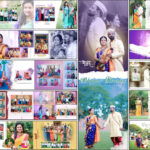
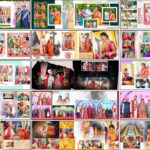
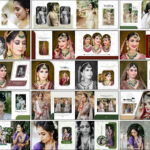
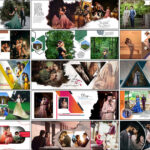
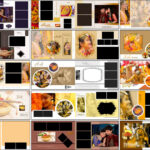
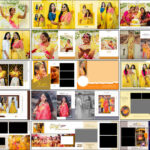
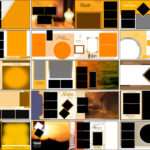
A wedding album becomes more interesting when every spread presents the photographs in a thoughtful way. A large couple portrait, a series of outdoor pictures, or a memorable beach photoshoot can each tell a different part of the wedding story. This collection of 20 Free Creative Wedding Album Design PSD Templates 12×36 offers ready-made layouts for photographers and album designers who want to create attractive wedding albums without designing every page from the beginning. The collection features creative photo collages, geometric frames, artistic backgrounds, and different colour combinations for wedding and pre-wedding photography. More options are available in the wedding album design PSD collection on LuckyStudio4U. These templates use editable Photoshop PSD files, allowing photographs, available text, colours, and design elements to be adjusted according to the project. The 12×36 layout gives designers a wide canvas for arranging photographs and creating a balanced album spread.

Inside the Collection: Design Details
- Total Designs: 20 creative wedding album templates
- Album Size: 12×36
- File Format: Adobe Photoshop PSD
- Design Style: Creative wedding, couple portraits, outdoor and pre-wedding photography
- Editable Elements: Photographs, available text, colours, and design elements
- Layers: Editable PSD layers
- Price: Free download
Give Wedding Photographs a More Creative Presentation
A good album layout does more than place photographs inside frames. It helps the viewer move naturally from one image to another. For example, a main couple portrait can introduce the page, while smaller photographs show different poses, expressions, or moments from the same photoshoot.
These 12×36 wedding album design PSD templates offer different ways to arrange photographs across a wide spread. Some layouts use circular and diamond-shaped frames, while others combine diagonal placement, overlapping pictures, and decorative details. This variety is helpful when an album contains several types of photographs, and each page needs its own look.
The designs can also be adapted to suit different photography styles. Outdoor couple portraits may work well with layouts that leave room for the original scenery, while close-up photographs may benefit from larger frames. The 12×36 album PSD collection offers more options for designers who need different layouts for a complete album.
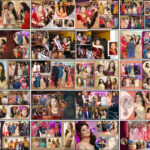
The preview images below help show the design variety, photo placement, and overall style of the available templates before editing begins.


Choose a Layout That Matches the Photographs
Not every wedding photograph needs the same type of layout. The best choice depends on the number of images, the background in each photograph, and the feeling the completed page should create. The styles in this collection offer several possibilities for arranging wedding memories.
Outdoor and Beach Photo Layouts
Outdoor photography often includes natural scenery, open spaces, gardens, and romantic couple poses. Beach photographs can have a different appearance, with wider views and backgrounds that are an important part of the image. A layout with a suitable photo area can help preserve these details instead of cropping away too much of the scene.
When using outdoor photographs, the main subjects should remain clear. Decorative frames and background effects can add interest, but they should not hide the couple or make the original picture difficult to see.
Geometric Frames and Photo Collages
Circular frames, diamond shapes, and diagonal photo arrangements provide alternatives to a page filled with standard rectangular pictures. These elements can help create a more creative composition, especially when several photographs need to appear on the same spread.
Overlapping photographs can also connect pictures from the same session. However, the layout should still have a clear focal point. A page with too many large pictures and decorative elements may feel crowded, so a balanced arrangement usually works better.
Colour Themes and Artistic Details
The collection includes green, teal, navy blue, maroon, purple, pink, and white colour combinations. It also features artistic backgrounds, brush effects, and decorative elements. These options give designers room to create different moods across the album rather than repeating one colour scheme on every page.
Darker backgrounds can provide contrast around bright photographs, while lighter colours can create a clean appearance. The final choice should match the selected images and keep attention on the wedding memories.


Make Better Use of the 12×36 Album Format
The 12×36 format offers a wide working area for a double-page spread. This is useful when one photograph needs to take the main position and other pictures are arranged around it. The same format can also accommodate several smaller photographs when the project requires a collage-style page.
Before selecting a template, it helps to group the photographs according to the event or photoshoot. Pictures from one outdoor session can be arranged together, while close-up portraits and other important images can be given separate space. This creates a clearer flow throughout the album.
Designers should also consider the centre of the spread when placing faces, text, and important details. The album binding may cover part of this area, depending on the printing method. Keeping important features away from the centre fold can help protect the final presentation.
Customize the Wedding Album PSD in Photoshop
These editable PSD templates provide a starting point for creating a personalized album. The amount of editing required depends on the selected layout and the photographs being used.
- Open the required PSD: Load the selected template in Adobe Photoshop and review the complete 12×36 layout.
- Understand the layers: Check the Layers panel to identify photo areas, backgrounds, text, and decorative elements.
- Add the photographs: Replace sample pictures with the selected wedding, couple, outdoor, or pre-wedding images.
- Adjust the crops: Position each photograph carefully so faces and important details remain visible.
- Change the text: Edit available text layers wherever names or other editable wording is included.
- Modify colours: Adjust editable backgrounds and other colour elements to match the photographs.
- Review decorative details: Resize or reposition individual design elements where the layer structure allows it.
- Save an editable copy: Keep a PSD version so that corrections can be made later without rebuilding the page.
- Check the final layout: Review alignment, spacing, photo quality, and the overall balance before exporting.
For printed albums, the final file should follow the printing laboratory’s requirements for document dimensions, colour settings, and export format. The quality of the original photographs also affects the finished result.
Complete the Album with Matching Designs
A consistent album design does not mean every page must look identical. Instead, different layouts can be used for portraits, traditional wedding photographs, couple sessions, and other important moments while maintaining a connected overall style.
These related collections provide more options for different photography projects:
- 25 Free Indian Wedding DM Album Design PSD for traditional wedding photography and album layouts.
- 20 Wedding Couple Portraits 12×36 Album Design PSD for couple-focused album pages.
- 20 Romantic Pre-Wedding Couple Album Design PSD for romantic portraits and pre-wedding photography.
- 15 Free Floral 12×36 Wedding Album Design PSD for layouts with floral styling.
For a matching outer presentation, the wedding album cover design collection provides additional design ideas.
Frequently Asked Questions
Q: How many creative wedding album PSD templates are included?
A: The collection includes 20 free creative wedding album design PSD templates in 12×36 format.
Q: What type of photographs can be used with these designs?
A: The layouts are suitable for wedding portraits, couple photography, outdoor photoshoots, beach scenes, and pre-wedding moments.
Q: Can the wedding album PSD templates be customized?
A: Yes. The editable PSD layers allow photographs, available text, colours, and design elements to be changed in Photoshop.
Q: Are these 12x36 wedding album templates free?
A: Yes. This collection is available as a free download.
Conclusion
20 Free Creative Wedding Album Design PSD Templates 12×36 offers a variety of layouts for presenting wedding memories with more visual interest. Circular and diamond-shaped frames, layered photo collages, artistic backgrounds, and different colour themes provide options for couple portraits, outdoor photography, and pre-wedding pictures. The editable Photoshop PSD files allow designers to adjust photographs, available text, colours, and other design elements according to their projects. For photographers and album designers who need creative layouts without starting every page from scratch, this free collection provides a useful foundation for building personalized 12×36 wedding albums.
Note:
If you’re facing issues with downloading the file such as "it may take up to 24 hours to be able to view or download the file" So please ensure you are logged into your Google account before attempting to download. This usually resolves the issue and allows you to download the file without any waiting time.