
Losing a loved one is one of the hardest moments in life, and keeping their memories alive becomes very important. A Death Photo Frame PSD with Name and Date allows you to create a respectful tribute for your family member or friend. With PSD templates, you can easily edit the frame, add their photo, name, and dates of birth and passing. If you are looking for additional design resources, you can also explore Our Photo Templates and beautifully designed Photo Collage PSD Templates for various occasions.
These frames are not only used in homes but also in obituaries, newspapers, and digital memorials. Thanks to Adobe Photoshop 2025, editing PSD templates has become easier and faster. You can adjust layers, apply effects, and add meaningful text without needing advanced design skills. If you are looking for modern and creative options, Photo Frame Collage Templates and Top PSD Collage Templates can also be customized for remembrance designs.
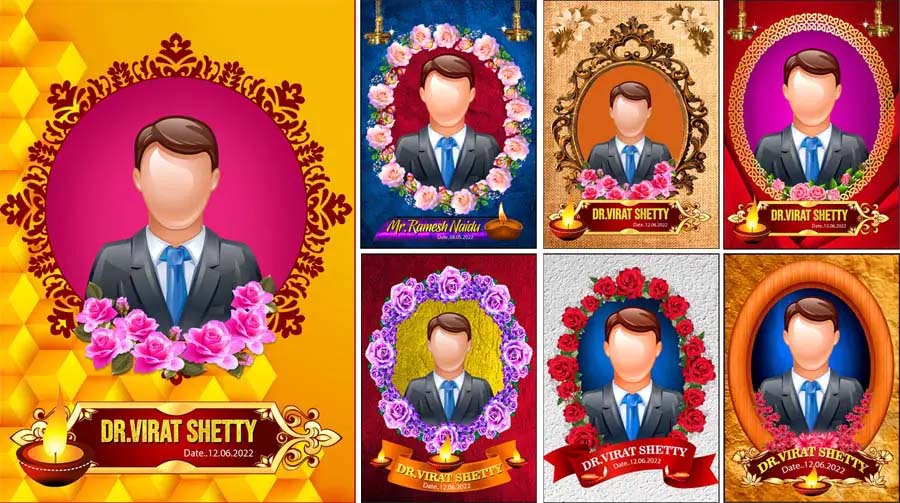
Why Choose PSD Templates for Death Photo Frames?
A PSD (Photoshop Document) file gives you full control over design elements. With funeral photo frame PSD templates, you can easily edit text layers, adjust colors, and insert photographs. Unlike static images, PSDs allow you to add or remove decorative borders, change background textures, and insert religious or cultural symbols.
Many people prefer death photo frame designs with name and date because they give a personal touch to the memory. For example, you can write “In Loving Memory of [Name]” along with the birth and death years. This makes the frame more meaningful and everlasting. The flexibility of PSD files ensures that you can resize them for printing as well as digital use.
Features of Death Photo Frame PSD Templates
- High-resolution designs (usually 300 dpi) are suitable for printing.
- Editable text layers for adding name, birth date, and death date.
- Decorative borders like floral, candlelight, and traditional motifs.
- Different aspect ratios: portrait, square, or rectangular frames.
- Compatible with Adobe Photoshop and other PSD-supporting software.
These features make obituary photo frame PSD free downloads very popular among designers, photographers, and printing studios. With just a few clicks, you can create a frame that is ready for use in announcements, social media, or memorial events.










How to Edit Death Photo Frame PSD with Name and Date
Editing a memorial photo frame PSD is simple, even if you are a beginner.
Here’s a quick step-by-step guide:
- Download the PSD file and open it in Adobe Photoshop.
- Locate the “Insert Photo” layer and add your chosen image.
- Edit the text layers to include the person’s full name, date of birth, and date of passing.
- Adjust background colors, borders, or religious symbols if required.
- Save the final design in JPEG or PNG format for printing or sharing online.
This process usually takes just a few minutes but creates a lasting tribute that can be cherished for years.
Types of Death Photo Frame PSD Designs
There are different styles of funeral PSD templates available for free download. You can choose according to your cultural, personal, or religious preferences.
Some popular types include:
- Classic Black & White Frames: Simple and elegant for newspaper obituaries or official use.
- Floral Memorial Frames: Decorated with roses, lilies, or lotus for a peaceful look.
- Religious Frames: Featuring crosses, Islamic calligraphy, or Hindu symbols.
- Modern Digital Frames: Minimalist styles suitable for online tributes.
- Collage Frames: Combine multiple pictures of your loved one in a single PSD template.
Benefits of Using Free Download PSD Templates
Downloading free obituary photo frame PSD templates saves both time and money. Instead of designing from scratch, you get a ready-to-use format that only requires minor adjustments. These templates also ensure professional quality, which is essential when creating something as meaningful as a memorial frame.
Another advantage is flexibility. You can use the same template for digital purposes (such as WhatsApp or Facebook tributes) and also print them in high resolution for physical frames. This dual usability makes PSD templates highly practical.
Where to Use Death Photo Frame PSD Templates
These death photo frame designs are used in several ways:
- Printed photo frames for homes and religious places.
- Obituary announcements in newspapers and magazines.
- Funeral programs and memorial service booklets.
- Digital tributes on social media platforms.
- Personal scrapbooks or photo albums to honor loved ones.
Tips for Choosing the Right Design
When selecting a funeral photo frame PSD, consider the following tips:
- Choose a frame that reflects the personality of the deceased.
- Use calming colors such as white, blue, or soft pastels.
- Include meaningful symbols, quotes, or prayers.
- Ensure the design matches both print and digital use requirements.
Conclusion
A Death Photo Frame PSD with Name and Date free download is a respectful and meaningful way to honor the memory of your loved one. These editable templates save time, provide professional quality, and allow personalization that truly reflects the life of the person being remembered. Whether for print or digital use, obituary and memorial PSD frames help keep memories alive forever.
Note:
If you’re facing issues with downloading the file such as "it may take up to 24 hours to be able to view or download the file" So please ensure you are logged into your Google account before attempting to download. This usually resolves the issue and allows you to download the file without any waiting time.
















