Album Xpress PRO 13.5 is a complete photo album design software that makes album creation fast and reliable for busy studios. This best photo album design software combines automatic album design tools with full manual control so photographers can deliver beautiful, print-ready albums without wasting time. Whether you work on wedding album design, photo book creation, or high-volume studio projects, Album Xpress PRO 13.5 streamlines the entire workflow from photo selection to final export. If you want to explore more trusted album design software options for studios and freelancers, you can find compatible tools and add-ons that pair well with Album Xpress for faster deliveries.

Album Xpress PRO 13.5 Photo Album Design Software Overview
Album Xpress PRO 13.5 is a leading automatic album design software that helps professional photographers create consistent and attractive wedding album design projects with minimal manual effort. It uses smart layouts and intelligent photo placement to speed up album creation without sacrificing quality. Photographers who want to explore modern automation can also compare this workflow with One Click AI Album Design Software to decide which solution best fits their studio requirements.
Many studio owners consider Album Xpress PRO 13.5 the best software for wedding album designing because it offers the right balance between automatic layouts and manual creative control. It is available for lifetime usage at an affordable price, making it a smart investment for any business. Compared to other fast album designing software, it focuses more on real production needs such as photo management, accurate alignment, and high-quality output. Photographers who want to compare speed and performance can also check Albumpoint fastest album designing software to understand the differences in workflow and design flexibility.
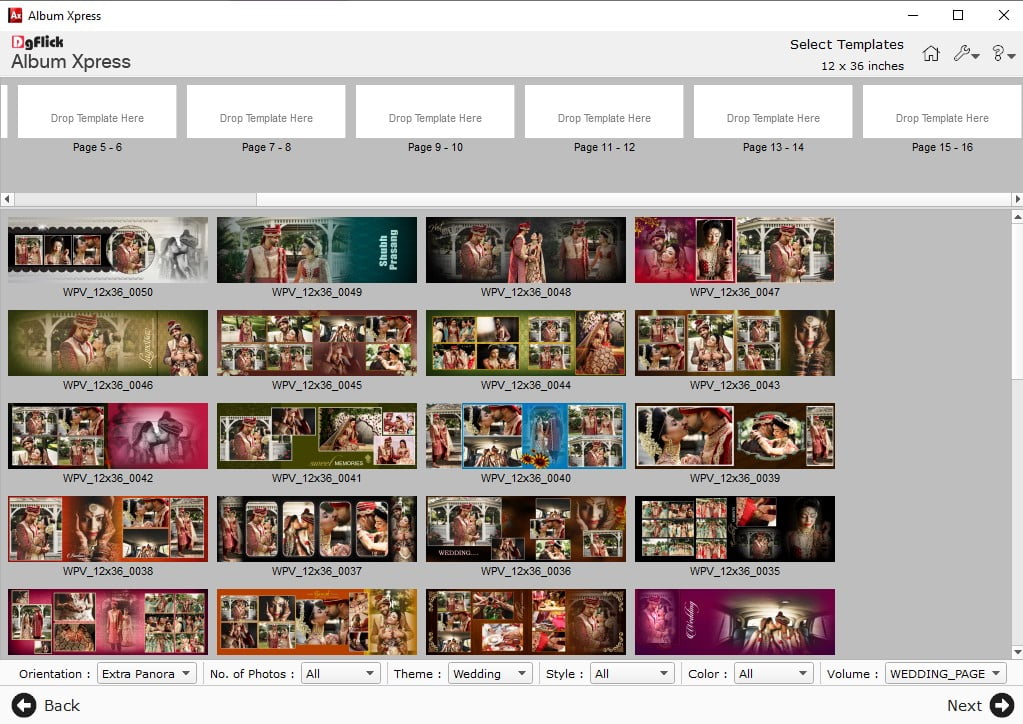
Album Xpress 13.5 includes ready-made album templates and powerful photo book creation tools that allow users to design albums in multiple sizes and styles. As a professional photo album design software, it gives photographers full control over layouts while ensuring albums remain print-ready. This combination of automation and manual editing makes it a trusted album designing software for professional photographers working on high-volume wedding projects.
Album Xpress PRO 13.5 Album Designing Software Complete Overview
If you prefer a visual guide, I have shared a complete video tutorial below that provides a thorough overview of Album Xpress PRO 13.5. This video is one of the best ways to see exactly how the features and tools work in real-time. Watching this walkthrough will give you a better understanding of the interface and help you master the software much faster for your studio projects.
Features of Album Xpress PRO 13.5
Below is a detailed breakdown of the features in Album Xpress 13.5. Reading through these highlights will help you understand how each tool streamlines your creative process and saves you significant time during production.
Advanced Photo Management & Sorting
Managing thousands of wedding clicks can be overwhelming, but this software makes it effortless. You get a comfortable full-screen view to pick your best shots without distraction. You can quickly sort images in any sequence, rename them in large batches, and move files between folders instantly. It is designed to keep your workspace organized so you can focus more on art and less on file management.
Pro-Level Photo Enhancement Tools
Bringing out the best colors in your photos is simple with built-in primary correction tools for BCG and RGB levels. If you have multiple images that need the same adjustment, the batch tilting and cropping feature is a total lifesaver. You can also apply artistic filters for a signature look or use the seamless Photoshop integration to access your favorite plugins directly within the workflow.
Creative Photo Editing & Retouching
Editing becomes a breeze with multi-layer cutting for precise cut-outs and a smooth green screen keying tool. To make your portraits pop, the skin tone perfection features allow you to remove blemishes, spots, and wrinkles while keeping the texture natural. Use the highlighter brush to retain vibrant colors or the easy eraser to remove unwanted objects easily.
Smart Selection & Client Collaboration
The bridge between a photographer and the client is now much shorter. You can share watermarked, low-resolution versions that the bride and groom can access on any device. This makes the selection process collaborative and fast. Instead of back-and-forth emails, you can filter and edit photos based on their direct feedback, ensuring the final album reflects exactly what the couple loves.
Precision Album Selection & Sizing
Getting the dimensions right is crucial for professional printing. This software offers ready-to-design configurations that match the requirements of major printing labs globally. You have the total freedom to customize album sizes, covers, and jackets based on specific binding styles. Whether it is a sleek modern book or a heavy traditional album, you can set the technical specs perfectly.
Dynamic Album Designing & Layouts
Designing should feel like storytelling, not data entry. With various creation modes and handcrafted layouts, you can unleash your creativity without being stuck in a rigid box. The smart design engine suggests templates that fit your photos beautifully. A standout feature is the flexibility to go back and tweak any template at any time, allowing for a unique, custom masterpiece.
Multi-Format Export & Saving Options
Once your masterpiece is ready, saving it is simple and flexible. You can export your final album in JPEG, PSD, PDF, or PNG formats depending on your needs. Choose PSD if you want to keep the layers for later tweaks in Photoshop, or go with JPEG for standard lab printing. This ensures that your final product is compatible with any printer or digital platform.
Affordable Licensing for Single PC and Multi PC Use
One of the best things about this software is how well it fits into different business sizes. Whether you are a solo photographer or running a large studio, there is a budget-friendly licensing plan for you. You can choose a setup that covers a single PC or opt for a multi-user license that allows your entire team to work simultaneously without breaking the bank.
Album Xpress PRO 13.5 System Requirements
Before installing the software, ensure your computer meets the following technical specifications to enjoy a smooth and lag-free designing experience:
- Operating System: Microsoft Windows 7, 8, 10, or 11 (32-bit and 64-bit).
- Processor: 2.8 GHz or higher processor for faster processing.
- RAM (Memory): Minimum 2 GB RAM (4 GB recommended for handling high-resolution files).
- Hard Disk Space: Minimum 2 GB free disk space (5 GB recommended for smooth workflow).
Having the recommended setup will help you handle high-resolution wedding photos and heavy album templates much more efficiently during the batch processing and export phases.
Conclusion
Album Xpress PRO 13.5 stands out as one of the best photo album design software options for wedding studios and professional photographers. It combines automatic album design software efficiency with deep manual controls that experienced users rely on. With album templates, strong photo management, and multiple export formats, you can produce print-ready albums quickly and consistently. If you want a reliable, affordable solution for high-quality album production, Album Xpress PRO 13.5 is a professional choice that speeds up delivery while keeping creative freedom intact.
Note:
If you’re facing issues with downloading the file such as "it may take up to 24 hours to be able to view or download the file" So please ensure you are logged into your Google account before attempting to download. This usually resolves the issue and allows you to download the file without any waiting time.