Professional beauty and portrait editing often involves several steps, including skin cleanup, color correction, texture refinement, and light balancing. Performing these tasks manually for every photograph can take a lot of time, especially when working with wedding albums, fashion shoots, and studio portraits. Beauty Retouching Tools 5.2 for Photoshop brings commonly used retouching functions into one organized panel to help make the editing process more efficient. It is designed for photographers, graphic designers, and retouchers who want better control over skin details, facial features, color tones, and the final appearance of their images. Instead of searching through different Photoshop menus for every adjustment, users can access a range of editing options from a more convenient workflow. You can also explore our collection of Photoshop plugins and creative editing tools for more ways to improve your editing process.
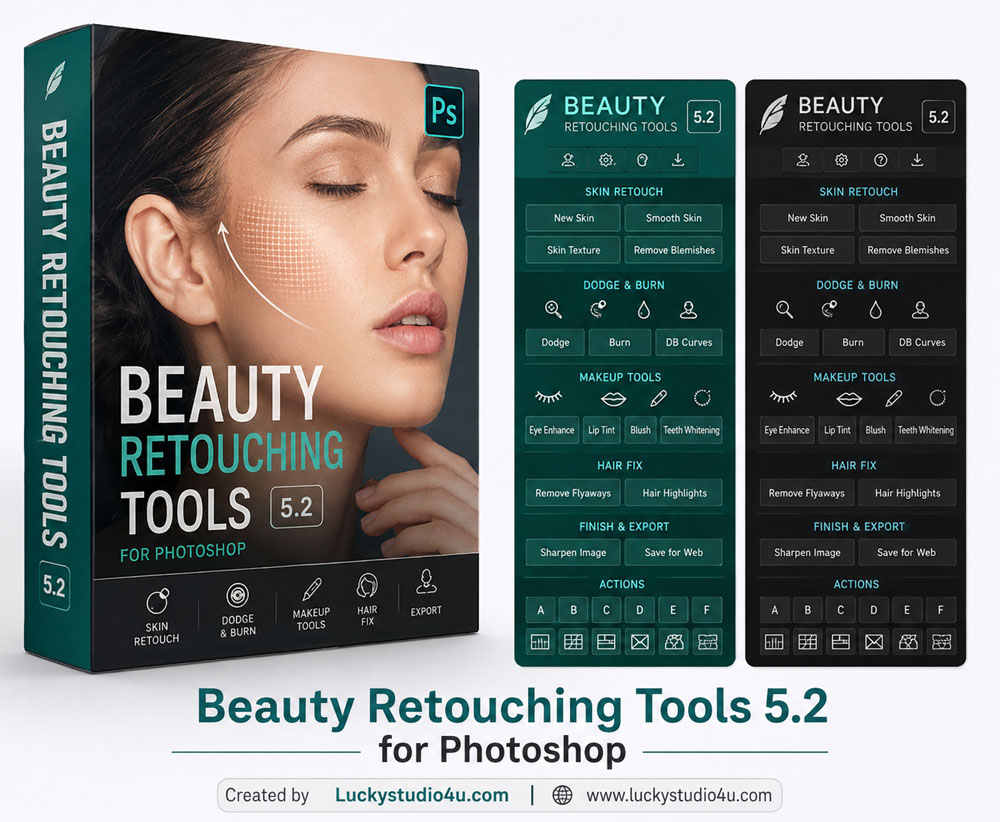
Overview of Beauty Retouching Tools 5.2
Beauty Retouching Tools 5.2 is designed to make detailed portrait editing easier by grouping frequently used retouching functions into a single Photoshop panel. Its workflow covers several important areas of beauty photography, including skin refinement, dodge and burn, frequency separation, color adjustments, and hair and makeup enhancement.
These tools help photographers work on different parts of a portrait without repeatedly building every adjustment from scratch. For example, skin imperfections can be cleaned up, uneven lighting can be refined, and color tones can be balanced as separate steps. Working with these adjustments individually also helps preserve realistic skin texture and avoid the overly smooth appearance that can result from excessive retouching.
The panel is intended to support both beginners learning portrait editing and experienced retouchers who want a more organized workflow. The final results still depend on the original photograph, the settings used, and the editor’s judgment.
Key Features of Beauty Retouching Tools 5.2
The panel combines several functions commonly used in professional beauty and portrait photography. The following are the main features described for this version.
- Skin Retouching: Helps clean up visible imperfections and improve the appearance of skin while aiming to retain natural texture.
- Dodge and Burn: Supports adjustments to highlights and shadows, making it easier to balance uneven lighting and add depth to portraits.
- Frequency Separation: Provides a workflow for working separately with color and texture during detailed skin editing.
- Texture Refinement: Helps retouchers refine skin details, particularly in close-up beauty and fashion photographs.
- Hair and Makeup Enhancement: Offers editing options for refining facial details, eyes, eyebrows, eyelashes, teeth, hair, and makeup where supported by the available tools.
- Color Tone Adjustments: Helps balance color, contrast, luminosity, and overall image appearance.
- Custom Photoshop Actions: Allows users to add up to six personal Photoshop actions for quicker access to frequently used editing steps, as described for this version.
- Organized Interface: Groups related editing functions together to make common retouching tasks easier to access.
- Output Options: Helps prepare finished images for client delivery and online use through available export and output controls.
- Additional Automated Tools: Some functions may provide automated assistance for cleaning up distractions or refining images, depending on the features included in the installed build.
Improve Skin Texture and Portrait Details
Skin editing is one of the most time-consuming parts of beauty photography. Small blemishes, uneven texture, and inconsistent skin color may become more noticeable in close-up images. A structured retouching workflow helps editors deal with these issues without applying the same correction to every part of the photograph.
Tools for skin cleanup and frequency separation can help separate color adjustments from texture work, while dodge and burn can be used to improve the appearance of light and shadow. These techniques are especially useful for bridal portraits, fashion photography, studio headshots, and beauty campaigns. For more focused skin color correction, you can also read about the Skin Tone V1 Plugin for Photoshop, which is designed to help balance uneven tones across visible skin areas.
For natural results, avoid removing every skin detail. The aim is to refine the portrait while retaining realistic texture, facial character, and the original look of the person.
Color Correction and Final Image Polish
Skin retouching is only one part of preparing a professional photograph. Color casts, uneven exposure, dull tones, and differences in lighting can also affect the final image. The color adjustment options in a retouching workflow can help bring these elements into better balance before the photograph is exported.
A useful approach is to correct exposure and white balance first, work on skin and facial details next, and then review the overall color and contrast. This order makes it easier to identify problems and avoid applying too many adjustments at once.
Editors looking for additional portrait and image-editing options can explore the Imagenomic Professional Plugin Suite. Different tools offer different workflows, so choose the functions that match the image and the type of editing required.
Who Can Use Beauty Retouching Tools 5.2?
This panel may be useful for photographers and editors who regularly work with portraits and beauty images. Its grouped functions can help reduce repetitive steps and make common adjustments easier to access.
- Wedding Photographers: Refine bridal portraits and prepare photographs for wedding albums.
- Studio Photographers: Improve headshots and portrait sessions with consistent editing.
- Beauty and Fashion Editors: Work on skin texture, makeup details, lighting, and color balance.
- Graphic Designers: Prepare polished portraits for promotional designs, banners, and creative projects.
- Freelance Retouchers: Organize frequently used adjustments into a more convenient workflow.
Those who also need broader image enhancement can explore Radiant Photo image enhancement software. It offers a different approach to improving photographs, so it may complement a retouching workflow when additional overall image adjustments are needed.
System Requirements
Before installing Beauty Retouching Tools 5.2, check that your computer and Photoshop version are compatible with the supplied build. The requirements listed for this version are:
- Adobe Photoshop: Photoshop 2021 or newer, with the required extension support.
- Operating System: Windows 10 or Windows 11 (64-bit), or macOS 10.15 and above.
- Processor: A multi-core processor is recommended for demanding editing tasks.
- RAM: 8 GB minimum; 16 GB or more is recommended for smoother performance.
- Graphics: A compatible graphics processor may help with supported accelerated features.
- Internet Connection: May be required for activation or updates, depending on the version.
These details are based on the supplied version information and should be checked against the actual package before installation. Requirements and compatibility can vary between builds.
How to Install Beauty Retouching Tools 5.2
- Download the supplied archive to your computer.
- Extract the files using a compatible archive utility. If prompted, use the password provided with the download.
- Read any included installation instructions before copying files or running an installer.
- Open Photoshop and follow the package instructions to install or enable the panel.
- Restart Photoshop if required, then check whether the panel appears in the expected location.
- Test the available functions on a duplicate image before using them in an important client project.
If the panel does not appear, check the Photoshop version, extension requirements, and installation instructions supplied with the package. Avoid installing files from sources you cannot trust, and scan downloaded archives before opening them.
Download Beauty Retouching Tools 5.2 for Photoshop
The download button below points to the supplied archive for Beauty Retouching Tools 5.2. Before installing it, verify that the file matches your Photoshop version and operating system.
Winrar File Pass: 123
Conclusion
Beauty Retouching Tools 5.2 for Photoshop brings common portrait-editing functions together in one organized workflow. Its skin retouching, dodge and burn, texture refinement, and color adjustment options can help photographers handle detailed editing more efficiently. It can be useful for wedding portraits, studio photography, beauty images, and fashion projects where a polished but natural appearance matters. For the best results, work carefully, preserve realistic skin texture, and confirm that the supplied version is compatible with your Photoshop installation.
Note:
If you’re facing issues with downloading the file such as "it may take up to 24 hours to be able to view or download the file" So please ensure you are logged into your Google account before attempting to download. This usually resolves the issue and allows you to download the file without any waiting time.