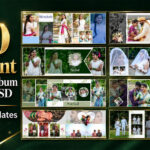
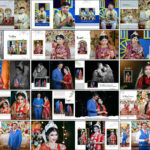
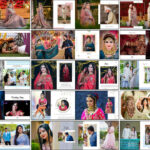
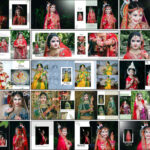
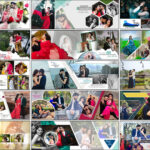
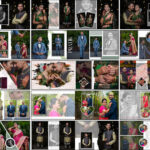
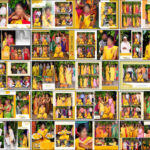
If you are looking for modern and stylish 12×36 Wedding Album PSD Templates 2025, this exclusive collection is designed to make your albums stand out. You can also check out 10000+ wedding album design psd for more variety and professional layouts.
These templates are built for professional wedding photography services and designers who want to save time while delivering unique albums to clients. Each sheet is crafted with attention to detail, allowing you to focus on creativity rather than spending hours on repetitive layout work.

Why Choose 12×36 Wedding Album PSD Templates 2025
The demand for Creative 12×36 Album PSD designs has grown rapidly because modern couples expect unique layouts and elegant storytelling in their wedding albums. To explore even more professional designs, visit our curated 12×36 album design psd collection that is loved by professional studios worldwide. These templates are not just visually appealing but also technically optimized for print production, making them a perfect choice for photographers who want efficiency with style.
Each fully editable 12×36 album PSD template is layered and organized, ensuring that even beginners in Photoshop can replace images, change backgrounds, and customize text easily. With dimensions of 12×36 inches at 300 dpi high resolution, the quality of these templates is unmatched. This high resolution guarantees sharp, detailed prints that work perfectly for premium photo album printing, whether you are producing layflat albums, hardcover wedding books, or luxury framed spreads.
Another big advantage of these templates is the time you save. Professional wedding photography services often face tight deadlines, and these PSDs help speed up workflow significantly. By using smart object replacement in Photoshop, you can insert photos with a single click and still maintain a polished and professional look. This allows you to deliver more albums in less time while maintaining creativity and uniqueness across every project.
Whether you are working on Haldi, Mehndi, Reception, or traditional wedding spreads, these creative photo album layouts adapt to every event theme. The templates feature a mix of couple close-up portrait spreads, multi-photo collage album templates, and elegant editorial-style layouts that appeal to modern clients. By integrating these PSDs into your workflow, you not only enhance your design quality but also improve client satisfaction and increase your chances of upselling premium photo album printing packages.


What’s Inside the Bundle:
- A complete collection of 12×36 Wedding Album PSD Templates 2025, carefully designed with high-quality layouts.
- Multiple creative 12×36 album PSD styles, including modern, traditional, and floral themes for different wedding ceremonies.
- Print-ready editable PSD sheets in 300 DPI high resolution, ensuring perfect results for premium photo album printing.
- Special couple close-up portrait spreads that highlight emotional and memorable wedding moments.
- Ready-to-use multi-photo collage album templates for haldi, mehndi, reception, and engagement functions.
- Easy customization through Photoshop smart object replacement saves time for professional wedding photography services.
Key Benefits for Photographers and Studios
- Access to a wide variety of Creative 12×36 Album PSD layouts. Many professionals also explore resources like 100 Latest edding album design psd to expand their creative options and enhance their editing workflow.
- Every file is a fully editable 12×36 album PSD template, allowing you to customize backgrounds, frames, overlays, and effects with ease.
- Designed specifically for wedding photography album design, these templates cover haldi, mehndi, sangeet, reception, and traditional wedding spreads.
- Saves hours of manual design work — just drag and drop images into smart objects for instant professional results.
- Ideal for studios offering professional wedding photography services, as faster delivery with high-quality layouts increases client satisfaction.
- Perfectly optimized for premium photo album printing, ensuring albums look luxurious in layflat or hardcover print formats.
- Fully compatible with the best photo editing software for PC, like Adobe Photoshop, giving editors flexibility in retouching and customization.
- A great asset for freelancers or studios offering photo retouching services online, helping them speed up work while maintaining a polished, professional finish.
- Enhances storytelling by providing pre-designed creative layouts that flow beautifully across the wedding album.
- A reliable resource for both beginner and professional designers who want consistent quality in every project.
Print and delivery tips
Export at 300 dpi and include a 3 to 5-millimeter bleed. Convert the final files to CMYK if your chosen lab requires it. For faster delivery, keep final PSDs organized in a client folder and supply a proof link for approval before ordering premium photo album printing.
How to customize these 12×36 album PSD templates
Follow this simple workflow to customize templates in minutes using Photoshop and deliver polished albums to clients.
- Open the PSD and locate the smart object placeholder for the photo frame.
- Double-click the smart object. Paste your retouched image and save the smart object to update the main layout.
- Use a single global adjustment layer to match color grading across spreads so the album reads as one story.
- Edit text layers for names, dates and short captions. Keep font sizes consistent across all spreads.
- Swap ornamental overlays with layer blend modes to change the mood without redesigning the layout.
- Export each spread at 300 dpi as JPEG for your album lab and create a proof PDF for client review.
Frequently Asked Questions
What are 12x36 Wedding Album PSD Templates 2025?
Are these PSD templates editable in Photoshop?
Can I use these templates for different wedding events?
What resolution do these wedding album PSDs come in?
Why should photographers use these PSD templates?
Do I need advanced Photoshop skills to edit these templates?
Can these designs be used for premium photo album printing?
Note:
If you’re facing issues with downloading the file such as "it may take up to 24 hours to be able to view or download the file" So please ensure you are logged into your Google account before attempting to download. This usually resolves the issue and allows you to download the file without any waiting time.