Luckystudio4uLuckystudio4u
  • Wedding Album Design
    • Wedding Album Cover
    • 12×36 Album PSD
    • 12×18 Album PSD
    • 12×30 Album PSD
    • 17×24 Album PSD
    • 24×18 Album PSD
  • Birthday Album Design
  • Photoshop Add-ons
  • Graphic Design Templates
  • Album Designs Software
Luckystudio4uLuckystudio4u
Search
  • Wedding Album Design
    • Wedding Album Cover
    • 12×36 Album PSD
    • 12×18 Album PSD
    • 12×30 Album PSD
    • 17×24 Album PSD
    • 24×18 Album PSD
  • Birthday Album Design
  • Photoshop Add-ons
  • Graphic Design Templates
  • Album Designs Software
Follow US
  • Contact us
  • DMCA
  • Privacy Policy
  • Terms and Conditions
  • Donate
  • Join Our Whatsapp Group
  • Join Our Telegram Group
© 2016-2022 All rights reserved Luckystudio4u.com

SkinFiner 3.0 Photoshop Plugin Free Download For Lifetime

Last updated: February 9, 2026 9:18 PM
Published December 9, 2023 Photoshop Plugins & Extensions

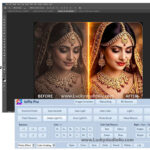
If you are a photographer or a creative designer, you already know that manual skin retouching is one of the most time-consuming tasks in post-production. Spending hours removing blemishes and fixing uneven skin tones can be exhausting. If you want to speed up your editing workflow without losing quality, the SkinFiner 3.0 Photoshop Plugin is a game-changer for you. This tool is specifically designed to provide high-end results in just a few clicks, making it a must-have for anyone looking for a free download of professional retouching software. If you are searching for more premium assets to enhance your projects, feel free to explore our Photoshop plugins collection for the latest tools.
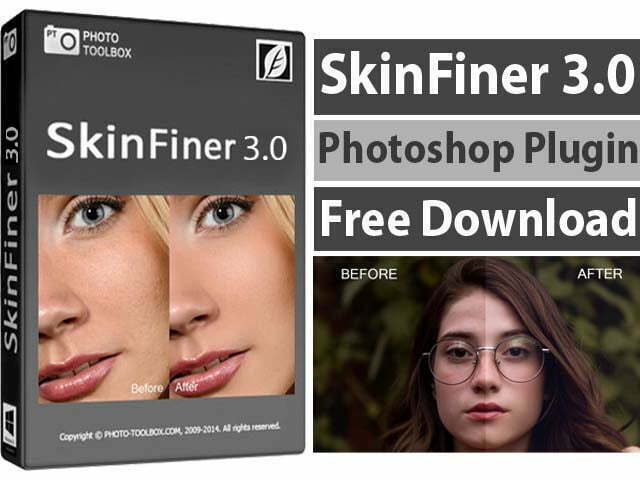
SkinFiner 3.0 Photoshop Plugin Free Download For Lifetime

Overview of SkinFiner V3.0 Photoshop Plugin

If you are looking for a way to get flawless skin while keeping the texture looking 100% real, SkinFiner V3.0 is the answer. Unlike basic beauty filters that make people look like plastic, this portrait skin retouching software uses intelligent detection to target only the skin, leaving the eyes, hair, and lips perfectly sharp. If you are also interested in exploring tools that offer advanced makeup or face reshaping features, you should definitely download WidsMob Portrait V2, as it works brilliantly alongside SkinFiner.

SkinFiner works as both a standalone photo editor and a dedicated plugin for Adobe Photoshop and Lightroom. It supports 16-bit color depth, which means your image quality stays professional and crisp even after heavy editing. Whether you are a wedding photographer or a studio professional, this tool ensures consistent results across all your portraits.

How to Install and Use SkinFiner V3.0

This video explains the complete process of installing SkinFiner V3.0 on your system, activating the software correctly, and using it inside Photoshop. The steps are shown in a clear and practical way, making it easy for beginners to follow and apply them in real editing projects.

What Is New in SkinFiner 3.0 Version

If you have used older versions, you will find version 3.0 much more refined. It features a brand-new skin smoothing algorithm that is significantly more realistic. The high DPI support ensures the interface is user-friendly on modern screens, and several bug fixes have made the overall performance much more stable.

Advanced Features of SkinFiner 3.0 Photoshop Plugin

If you are wondering why this plugin is so popular among editors, here is a list of its most powerful features:

  • Intelligent Skin Detection: It automatically creates a mask for the skin so you don’t have to paint it manually.
  • Natural Texture Smoothing: Removes acne and wrinkles while preserving the real skin pores.
  • 16-bit Color Depth Support: Professional-grade processing that prevents color banding in high-quality images.
  • Batch Processing Capability: If you have hundreds of photos from an event, you can process them all in one go.
  • High DPI Interface: Looks beautiful and sharp even on 4K monitors.
  • Flexible Workflow: Use it as a Photoshop CC plugin, a Lightroom filter, or a separate app.
  • Auto-Skin Mask: Automatically discovers the skin area, which you can fine-tune with simple sliders.
  • Fast Rendering: Optimized to work quickly even on lower-end PC systems.

Main Functions and Capabilities

If you want total control over your edit, SkinFiner provides more than just smoothing:

  • Skin Tone Adjustment: Quickly fix redness or yellowish tones for a healthy look.
  • Lighting Enhancements: Add a subtle glow to the skin to make the portrait pop.
  • Non-Destructive Editing: Your original photo stays safe while you experiment with different looks.
  • Preset Management: Save your favorite settings to apply them to future projects instantly.

How to Use SkinFiner in Photoshop (Quick Steps)

  • Open the photo in Photoshop and duplicate your background layer (non-destructive).
  • Run SkinFiner as a plugin (Filter → SkinFiner) or open the standalone app and export back to Photoshop.
  • Use the automatic skin mask to apply smoothing; adjust the Amount and Preserve Texture sliders for a natural look.
  • Fine-tune eyes, lips, and hair by masking them out or lowering the effect strength on those regions.
  • Use batch mode to apply the same presets to a folder of images for consistent results.
  • Export in 16-bit if you need print-quality output, or 8-bit high quality for web use.

SkinFiner 3.0 Minimum System Requirements

If you are ready to download, just make sure your PC meets these basic specs:

  • Operating System: Windows 7, 8, 10, or 11 (Supports both 32-bit and 64-bit).
  • RAM: 4 GB minimum (8 GB is recommended for high-res files).
  • Storage: Only 35 MB of free disk space required.
  • Display: 1024 x 768 or higher resolution.

Winrar Password: www.Luckystudio4u.com

DOWNLOAD NOW

Conclusion

SkinFiner 3.0 Photoshop Plugin is a strong choice for portrait and wedding photographers who want fast, natural-looking skin retouching. For other helpful plugins and portrait tools, explore our Photoshop plugins collection and related portrait tools available on the site.

Subscribe Our Telegram Channel Subscribe Our WhatsApp Channel

Note: If you’re facing issues with downloading the file such as "it may take up to 24 hours to be able to view or download the file" So please ensure you are logged into your Google account before attempting to download. This usually resolves the issue and allows you to download the file without any waiting time.

Note: If you're having trouble extracting the downloaded file, such as "wrong password" errors, please download and install 7-Zip software for extracting your file. This free software solves most extraction problems.
Share This Article
Facebook Twitter Pinterest Whatsapp Whatsapp Tumblr Reddit Telegram Copy Link
By Zahid Mehboob
Admin
Follow:
Zahid Mehboob is a graphic designer, wedding album designer, blogger, and YouTube creator with 12 years of experience. He shares useful design resources, Photoshop tips, album design ideas, and other creative content for photographers and designers. He enjoys exploring new tools and techniques that make design work easier and help creators improve their skills.

Search Graphic Resources

Exclusive Products

ColorTune AI: One-Click Finish Photo Color Correction Software
Software
Julie Iconic Album Design Software
Album Designs Software
InPix Pro Auto Photo Finishing, Color Correction & Retouching Software
Software
Album-Xpress-13.5-Best-Photo-Album-Design-Software
Album Xpress PRO 13.5 | Best Photo Album Design Software
Album Designs Software
One Click AI Album 2026 Software
Album Designs Software
AlbumPoint 6.75 - Fastest Album Designing Software
AlbumPoint 6.75 – Fastest Album Designing Software
Album Designs Software
One Click AI Album 2025
One Click AI Album 2025 Software
Album Designs Software
edius x free download
EDIUS X Full Version Download
Software

Trending: 12x36 Album Designs PSD (2026)

55 Traditional Marathi Wedding Album Design PSD Templates
12x36 Album PSD
30 Traditional Indian Wedding Album PSD Templates 12x36
30 Traditional Indian Wedding Album PSD Templates 12×36
12x36 Album PSD
20 Bridal Portrait Album Design PSD Templates 12x36
20 Bridal Portrait Album Design PSD Templates 12×36
12x36 Album PSD
20 Free Pre-Wedding Photoshoot Album PSD Designs 12x36
20 Free Pre-Wedding Photoshoot Album PSD Designs 12×36
12x36 Album PSD
15 Indian Haldi Ceremony Album Designs PSD Free Download
12x36 Album PSD
12x36 Haldi Album Design PSD Templates Free Download
12×36 Haldi Album Design PSD Templates Free Download
12x36 Album PSD
15 Free Haldi Album Design PSD Templates 12x36
15 Free Haldi Album Design PSD Templates 12×36
12x36 Album PSD
20 Latest 12x36 Pre-Wedding Album PSD Designs Free Download
20 Latest 12×36 Pre-Wedding Album PSD Designs Free Download
12x36 Album PSD

Categories

  • 12×18 Album PSD26
  • 12×30 Album PSD21
  • 12×36 Album PSD235
  • 17×24 Album PSD4
  • 24×18 Album PSD5
  • AE Projects858
  • After Effect106
  • Album Designs Software17
  • Birthday Album Design18
  • Business Cards83
  • DaVinci Resolve10
  • Digital Paper31
  • Editing Services2
  • extensions-scripts25
  • Final Cut Pro Assets5
  • Flyer249
  • Fonts186
  • Free Invitation Templates88
  • Free Mockup721
  • Gradients12
  • Graphic Design Templates676
  • JPG And PNG65
  • Lightroom Presets939
  • LUTs182
  • Photo Backgrounds447
  • Photo Collage Templates82
  • Photo Effects398
  • Photo Overlays1,105
  • Photo Templates129
  • Photoshop549
  • Photoshop Actions1,910
  • Photoshop Brushes176
  • Photoshop Patterns178
  • Photoshop Plugins & Extensions150
  • Photoshop Shapes34
  • Photoshop Styles58
  • Photoshop Tutorials15
  • Plugins & Extensions4
  • Premiere Pro80
  • Premiere Transition10
  • Premium Album Designs79
  • Procreate30
  • Procreate Brushes51
  • Project Files21
  • Quotes21
  • Raw Presets62
  • Social Media322
  • Software115
  • Studio Background21
  • Swatches5
  • Text Effects224
  • Textures174
  • Titles13
  • Transparent PNG284
  • Video course51
  • Video Effects27
  • Video Footage11
  • Video Plugins12
  • Video Projects35
  • Videohive378
  • Wedding Album Cover41
  • Wedding Album Design126
  • Wedding Album DM89
  • Wedding Backgrounds31

Recommended Posts

Skin Tone V1 Plugin For Photoshop

Skin Tone V1 Plugin For Photoshop

Perfectly Clear WorkBench Download (Latest 2025)

Perfectly Clear WorkBench Download (Latest 2025)

Eye Candy 7 Photoshop Plug-in Free Download

Eye Candy 7 Photoshop Plug-in Free Download

Beauty Retouching Tools 5.2 for Photoshop Free Download

Beauty Retouching Tools 5.2 for Photoshop Free Download

© 2026 All rights reserved Luckystudio4u.com
  • Contact us
  • DMCA
  • Privacy Policy
  • Terms and Conditions
  • Donate
  • Join Our Whatsapp Group
  • Join Our Telegram Group
lUCKYSTUDIO4U PNG LOGOO lUCKYSTUDIO4U PNG LOGOO
Welcome Back!

Sign in to your account

Username or Email Address
Password

Lost your password?