If you are a photographer or a creative designer, you already know that manual skin retouching is one of the most time-consuming tasks in post-production. Spending hours removing blemishes and fixing uneven skin tones can be exhausting. If you want to speed up your editing workflow without losing quality, the SkinFiner 3.0 Photoshop Plugin is a game-changer for you. This tool is specifically designed to provide high-end results in just a few clicks, making it a must-have for anyone looking for a free download of professional retouching software. If you are searching for more premium assets to enhance your projects, feel free to explore our Photoshop plugins collection for the latest tools.
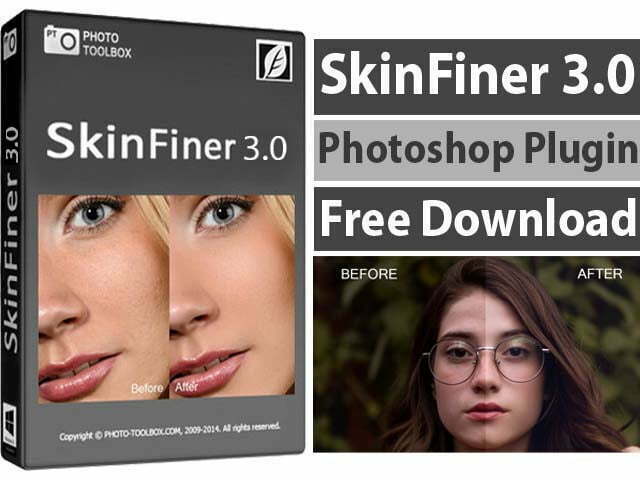
Overview of SkinFiner V3.0 Photoshop Plugin
If you are looking for a way to get flawless skin while keeping the texture looking 100% real, SkinFiner V3.0 is the answer. Unlike basic beauty filters that make people look like plastic, this portrait skin retouching software uses intelligent detection to target only the skin, leaving the eyes, hair, and lips perfectly sharp. If you are also interested in exploring tools that offer advanced makeup or face reshaping features, you should definitely download WidsMob Portrait V2, as it works brilliantly alongside SkinFiner.
SkinFiner works as both a standalone photo editor and a dedicated plugin for Adobe Photoshop and Lightroom. It supports 16-bit color depth, which means your image quality stays professional and crisp even after heavy editing. Whether you are a wedding photographer or a studio professional, this tool ensures consistent results across all your portraits.
How to Install and Use SkinFiner V3.0
This video explains the complete process of installing SkinFiner V3.0 on your system, activating the software correctly, and using it inside Photoshop. The steps are shown in a clear and practical way, making it easy for beginners to follow and apply them in real editing projects.
What Is New in SkinFiner 3.0 Version
If you have used older versions, you will find version 3.0 much more refined. It features a brand-new skin smoothing algorithm that is significantly more realistic. The high DPI support ensures the interface is user-friendly on modern screens, and several bug fixes have made the overall performance much more stable.
Advanced Features of SkinFiner 3.0 Photoshop Plugin
If you are wondering why this plugin is so popular among editors, here is a list of its most powerful features:
- Intelligent Skin Detection: It automatically creates a mask for the skin so you don’t have to paint it manually.
- Natural Texture Smoothing: Removes acne and wrinkles while preserving the real skin pores.
- 16-bit Color Depth Support: Professional-grade processing that prevents color banding in high-quality images.
- Batch Processing Capability: If you have hundreds of photos from an event, you can process them all in one go.
- High DPI Interface: Looks beautiful and sharp even on 4K monitors.
- Flexible Workflow: Use it as a Photoshop CC plugin, a Lightroom filter, or a separate app.
- Auto-Skin Mask: Automatically discovers the skin area, which you can fine-tune with simple sliders.
- Fast Rendering: Optimized to work quickly even on lower-end PC systems.
Main Functions and Capabilities
If you want total control over your edit, SkinFiner provides more than just smoothing:
- Skin Tone Adjustment: Quickly fix redness or yellowish tones for a healthy look.
- Lighting Enhancements: Add a subtle glow to the skin to make the portrait pop.
- Non-Destructive Editing: Your original photo stays safe while you experiment with different looks.
- Preset Management: Save your favorite settings to apply them to future projects instantly.
How to Use SkinFiner in Photoshop (Quick Steps)
- Open the photo in Photoshop and duplicate your background layer (non-destructive).
- Run SkinFiner as a plugin (Filter → SkinFiner) or open the standalone app and export back to Photoshop.
- Use the automatic skin mask to apply smoothing; adjust the Amount and Preserve Texture sliders for a natural look.
- Fine-tune eyes, lips, and hair by masking them out or lowering the effect strength on those regions.
- Use batch mode to apply the same presets to a folder of images for consistent results.
- Export in 16-bit if you need print-quality output, or 8-bit high quality for web use.
SkinFiner 3.0 Minimum System Requirements
If you are ready to download, just make sure your PC meets these basic specs:
- Operating System: Windows 7, 8, 10, or 11 (Supports both 32-bit and 64-bit).
- RAM: 4 GB minimum (8 GB is recommended for high-res files).
- Storage: Only 35 MB of free disk space required.
- Display: 1024 x 768 or higher resolution.
Winrar Password: www.Luckystudio4u.com
Conclusion
SkinFiner 3.0 Photoshop Plugin is a strong choice for portrait and wedding photographers who want fast, natural-looking skin retouching. For other helpful plugins and portrait tools, explore our Photoshop plugins collection and related portrait tools available on the site.
Note:
If you’re facing issues with downloading the file such as "it may take up to 24 hours to be able to view or download the file" So please ensure you are logged into your Google account before attempting to download. This usually resolves the issue and allows you to download the file without any waiting time.